MPL Rummy: Up to ₹10,000 Welcome Rewards
A promotion can be accurate and still be misunderstood. For MPL Rummy, the current…


Last updated: 29 August 2026
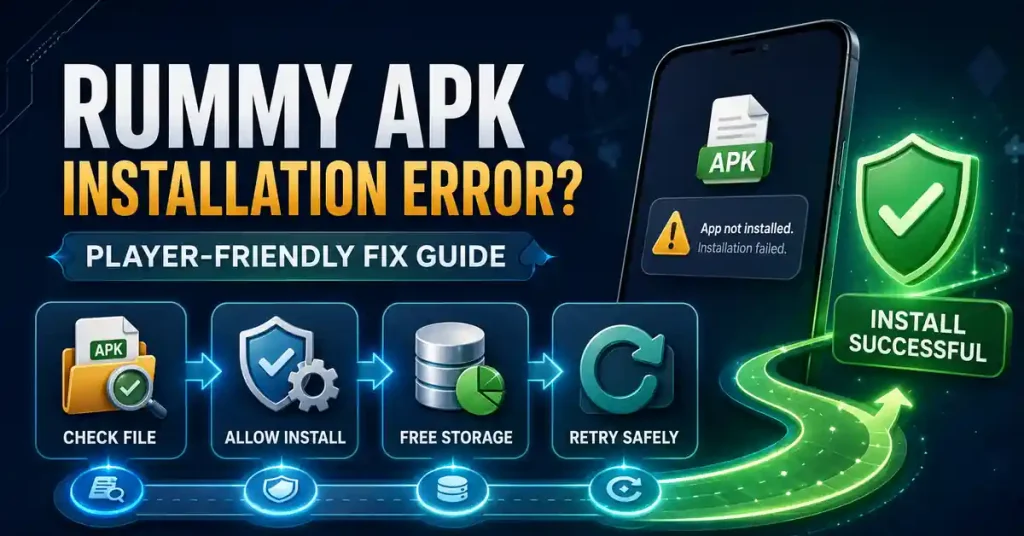
An APK installation error matters because every gameplay decision depends on having the intended app on the phone. Start with source and compatibility, then troubleshoot the Android message. The safe APK guide provides the wider installation context.
If you need to compare apps after resolving the issue, browse the all rummy apps guide and choose by rules, account clarity and safety rather than by urgency.
An older phone may not support a newer APK. Check the Android requirement when it is available and avoid assuming that a smaller file will solve a version mismatch.
Grant install permission only to the browser or file manager you intentionally used. Remove the permission when setup is complete.
Know how you will sign back in and save important transaction references before removing the app.
No APK version creates guaranteed card outcomes. Treat files promising improved winning odds, unlocked cash or hacked balance as warning signs.
“App not installed,” parsing errors and package conflicts are not the same problem. Note the message so your next step addresses the cause rather than repeating the same failed install.
Leave extra space for Android to unpack the package. A device close to full storage can fail even when the APK itself fits.
A signature mismatch can mean the new file is not the same product. Confirm identity before uninstalling the existing app or disabling security tools.
Open the rules, lobby, wallet and support area before using real money. Successful installation is not the same as a complete verification.
Share the error message and Android version with official support, but never provide passwords, OTPs or payment PINs.
A player cannot evaluate rules, tables or strategy if the installed package is not the intended app. Start by confirming the source and the name Android shows before you troubleshoot anything else.
Before another install, compare the domain, installer name and requested permissions. Use the fake or cloned app guide if any part of the package identity changed during troubleshooting.
Installation urgency often comes from wanting to join a game immediately. Remove that pressure. Fix the software first, then decide whether you still want to play.
A package error has nothing to do with rummy skill. Do not accept claims that a special APK fixes installation and improves winning odds at the same time.
A broken transfer can produce a parsing error. Re-download from the same verified route on a stable connection before trying invasive changes.
When the app opens, read the rules and table labels again. A new build can change interface details even when the product identity is correct.
If troubleshooting took longer than expected, reconsider whether you still have enough time and attention for a real-money session. Do not rush into play simply because the app finally installed.
Repeated install failures can be frustrating. A pause is safer than lowering security standards because you want the problem finished quickly.
Technical troubleshooting can consume the attention you planned for the session. If the install finally works late, shorten or postpone real-money play rather than rushing into a table.
A new or reinstalled build may move menus. Reopen the table rules and account controls before assuming the interface is unchanged.
Installation problems can create impatience. Take a pause so the first paid decision is not made while you are still annoyed by the technical issue.
Software success has no relationship to card outcomes. Reset your expectations before you play.
This guide is for adults aged 18+ where real-money gaming is allowed. Keep technical or account problems separate from spending decisions, and do not chase losses while trying to resolve them.
Record the Android error, confirm the file source and check compatibility before changing settings or downloading another package.
No. Understand whether the failure comes from storage, compatibility, corruption or a package conflict before removing a working installation.
Avoid modified packages. They can introduce a different security problem while hiding the original cause.
Check the branding, account route, rules, wallet and support area before starting a real-money session.
 Uncategorized
A promotion can be accurate and still be misunderstood. For MPL Rummy, the current…
This Royally Rummy guide starts with the offer because that is what many readers…
 Uncategorized
A promotion can be accurate and still be misunderstood. For Rummy 51, the current…